
ShowMeYourHotKeys
Show all app menu items hotkeys
v1.13(14) BETA, end date 2022-12-01
macOS 10.11+, Intel & Apple Silicon
beta expires at 2022-12-31
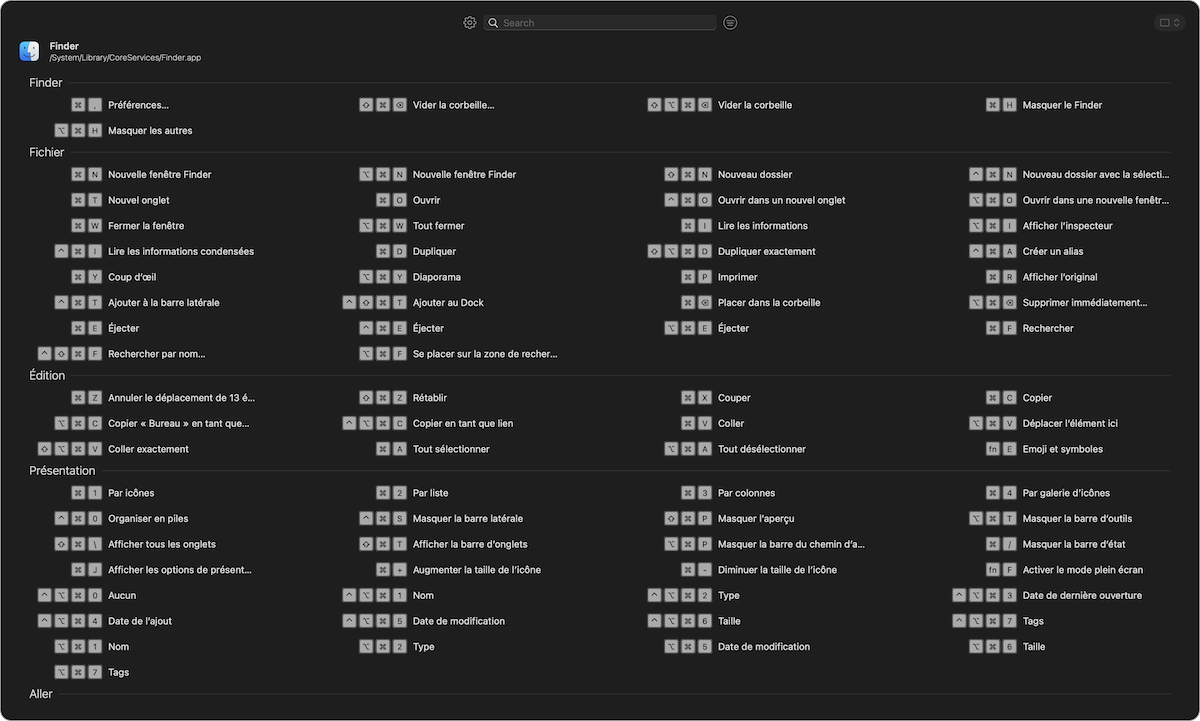
Persistant window
Press ⌘ 3 times to open the persistant window. When switching application, the hotkeys list will be updated soon after.
Press ⌘ 3 times to close the window.
Instant window
Press a few seconds on ⌘ to show the instant window.
Release all keys to close the window.
Filter hotkeys list
Filter the hotkeys list on menu title and/or on modifiers keys (⌘,⌥,⌃,⇧ or fn)
Custom hotkeys
Changes menu items shortcuts with your own custom shortcuts.
Assign a shortcuts to menu items that don't have one.
Bookmark
Bookmark Hotkeys. A bookmarked hotkeys is always showed at the top of the list.
On screen hot keys
Show hotkeys on screen while typing.
All Features of ShowMeYourHotKeys

Windows
Use the persistent window or the temporary "long-press" window. Choose over four available window layout.

Filter hotKeys
Filter app hotkeys to quickly find the one you are looking for.

Bookmarks
Bookmark yours favorites app's hot keys. ShowMeYourHotKeys will show them always on top of the list.

Settings
Defines how and when ShowMeYourHotKeys will show hotkeys.

Database
Browse all hotKeys of your applications.

Generate CheatSheet
Generate PDF CheatSheet of your applications.

Display keys on Screen
Display keys on screen while typing.

Custom hotkeys
Define your own custom hotkeys for applications menu items.

System hotKeys (soon)
Display all system hotKeys.

Made with 💻, 🖐 and ❤️ by Mox Adventu